
 Polski

Office 2024 Pro Plus purchase - How to activate the suite - Instructions
- 14 May, 2025
- Lista blogów
Thank you for purchasing Microsoft Office 2021 Professional Plus (No calls):
Key type: USED
WARNING! The package without activation is a 30-day trial version!
To activate a used package phone activation is required - instructions below!
Step 1: Download the installer
Aby rozpocząć instalację, należy pobrać pakiet instalacyjny z poniższego źródła. W zależności od preferencji językowych, wybierz odpowiednią opcję:
Polski:
https://drive.google.com/file/d/1hmy_ZgE-FFJ5jdi_zlAISUNLH5XufiMJ/view?usp=sharing
Lub
https://drive.google.com/file/d/1c6jsp6JoEJSlPgiChKi87jeFifC4I9Ht/view?usp=drivesdk
Polish language version: Download the installation file and run it.
English:
https://1drv.ms/u/c/a8bbebb7bf169e5b/ET5QmiG4Ve1NmKPXL53qgk8BgnBLM199xds6Q3dAE4ogQQ?e=aTffBo
English version: Open the .zip file and copy the extracted folder to another location. Then, click "Click to run" to start the installation process.
Other languages:
https://trendyiptv.com/download_office24/
Krok 2: Instalacja Office 2024 Pro Plus
After downloading the installation file, perform the following steps:
- Run the installer – by double-clicking the left button or right-clicking to run.
- If the Windows Defender SmartScreen message appears, kliknij opcję „Więcej informacji”, and then select Run anyway.
After the installation process is complete, Office 2024 Pro Plus will be ready to use.
Telephone activation instruction (Without calling):
1. Uruchom aplikację np. word.
2. Wybierz Online activation and sprawdź komunikat - Prawidłowy " Cannot activate the installation because the multiple activation key limit has been reached... "
W przypadku komunikatu 0xC004C060 or The key was recognized as invalid - contact us to exchange the key, do not continue the activation process!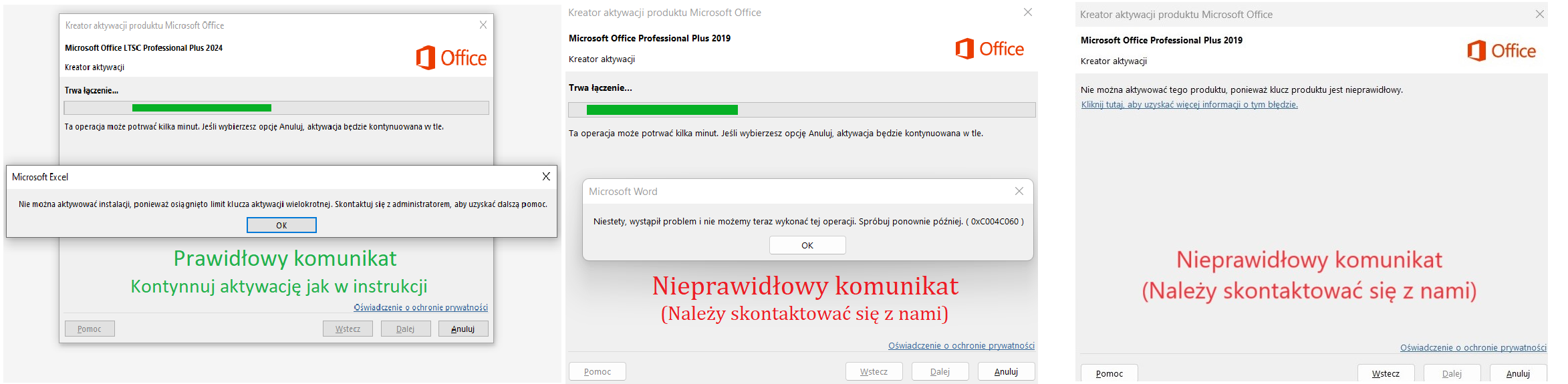
If the activation window does not appear, select: Konto / Zmień licencję / Użyj innego konta / Mam klucz produktu (Tutaj wpisz zakupiony klucz) następnie: Activate / Activation via the internet
(Jeśli dalej nie wyświetla się opcja aktywacji wyloguj się z konta Microsoft w zakładce konto oraz ponownie uruchom aplikację)
3. Kliknij Back and select Phone activation.
4. Re-enter the digits do strony https://key-soft-activator.pl/ oraz kliknij Generate confirmation ID..png)
(W przypadku urządzeń z systemem IOS możesz zrobić zdjęcie oraz skopiować i wkleić cyfry do strony)
5. Przepisz ID do step 3 oraz confirm.
(You can take a screenshot of the received ID for reactivation of the package)..png)
Done, the product has been activated!
E-Mail: [email protected]






