

Office 2024 Pro Plus Purchase - How to Activate the Suite - Instructions
- May 14, 2025
- List of blogs
- 18 Comments
Thank you for purchasing Microsoft Office 2021 Professional Plus (Without calling):
Key type:USED
ATTENTION! The package without activation is a 30-day trial version!
To activate the used package, telephone activation is required—see instructions below!
Step 1: Download the installer
To begin the installation, download the installation package from the source below. Depending on your language preference, select the appropriate option:
Polish:
https://drive.google.com/file/d/1hmy_ZgE-FFJ5jdi_zlAISUNLH5XufiMJ/view?usp=sharing
Or
https://drive.google.com/file/d/1c6jsp6JoEJSlPgiChKi87jeFifC4I9Ht/view?usp=drivesdk
English version:Download the installation file and run it.
https://1drv.ms/u/c/a8bbebb7bf169e5b/ET5QmiG4Ve1NmKPXL53qgk8BgnBLM199xds6Q3dAE4ogQQ?e=aTffBo
English version: Open the .zip Save the file and copy the extracted folder to another location. Then, click "Click to run" to start the installation process.
Other languages:
https://trendyiptv.com/download_office24/
Step 2: Installing Office 2024 Pro Plus
After downloading the installation file, follow these steps:
- Run the installerby double-clicking the left mouse button or right-clicking to run it.
- If you see a Windows Defender SmartScreen message, click"More info," and then select"Run anyway."
Once the installation process is complete, Office 2024 Pro Plus will be ready to use.
Instructions for phone activation (Without calling):
1.Launch an application, such as Word.
2. Select"Activate online" andcheck the message: "Valid" The installation cannot be activated because the limit for multiple activations has been reached... "
In the event of a message 0xC004C060orThe key was recognized as invalid - Please contact us to exchange your key; do not continue with the activation process!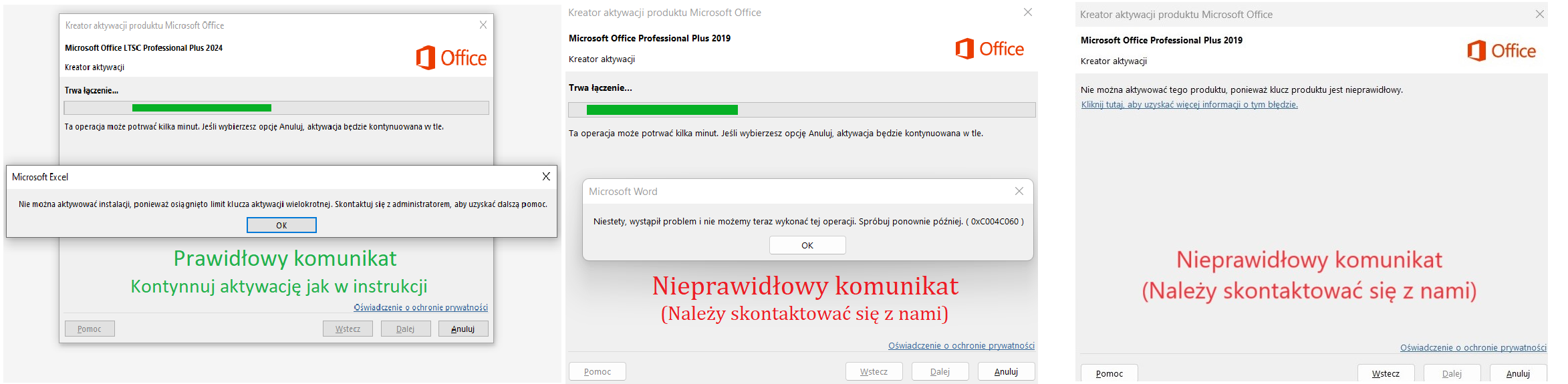
If the activation window does not appear, select:Account / Change license / Use a different account / I have a product key (Enter the key you purchased here), then:Activate / Online activation
(If the activation option still does not appear, sign out of your Microsoft account in the Account tab and restart the app)
3. Click Back and Select "Phone Activation."
4. Type the numbers to the website https://key-soft-activator.pl/ and click Generate a confirmation ID..png)
(For iOS devices, you can take a photo and copy and paste the numbers into the page)
5. Copy the ID to Step 3 and confirm.
(You can take a screenshot of the ID you received to reactivate the package.).png)
All done—the product has been activated!
Email:BOK@Key-Soft.pl







Don't give me any nonsense. The link keeps breaking and I can't download it. I'm asking for a refund again. I don't know what part of this you don't understand.
The links to download the installer don't work—what a rip-off...
You're just an idiot, so it doesn't work.
Everything works, thanks :). As for the comment above, if the download isn’t working, it’s because your browser is blocking the file—that’s what happened to me with Chrome. Just disable that security feature in your browser for a moment, and it’ll work like a charm. Other than that, everything’s fine—no viruses, and neither my antivirus nor firewall is flagging anything. Good luck. ;)
Everything works great—I highly recommend it.
P.S. The instructions are intuitive and helpful.
Note the " " characters in the XML file
After the correction, it should look like this:
All quotation marks in the format \" \"
The description isn't entirely clear. The package has been activated. ;)
The activation went quickly and smoothly :)
Today is October 24, 2025. Everything is working fine.
I recommend it—the activation was successful and the product is now activated :) I recommend it!
Everything's fine—the activator from the website is great.
Has anyone managed to resolve the ID generation issue? I can't use the Installation ID. The following message appears: "Error! Please double-check the numbers or try again later." I'm certain the numbers are entered correctly.
Everything is working as it should. Best regards
Everything's fine.
The keys you purchase work right away—no additional (usually so annoying) steps are needed to activate the program.
I REALLY RECOMMEND IT!!!
The activation works, but the instructions are messed up.
If only I could activate it—I keep getting the message: "Error adding ID to queue."