

Windows 12 – czego możemy się spodziewać po nowym systemie?
- 14 Wrz, 2024
- Lista blogów
- 0 Komentarzy
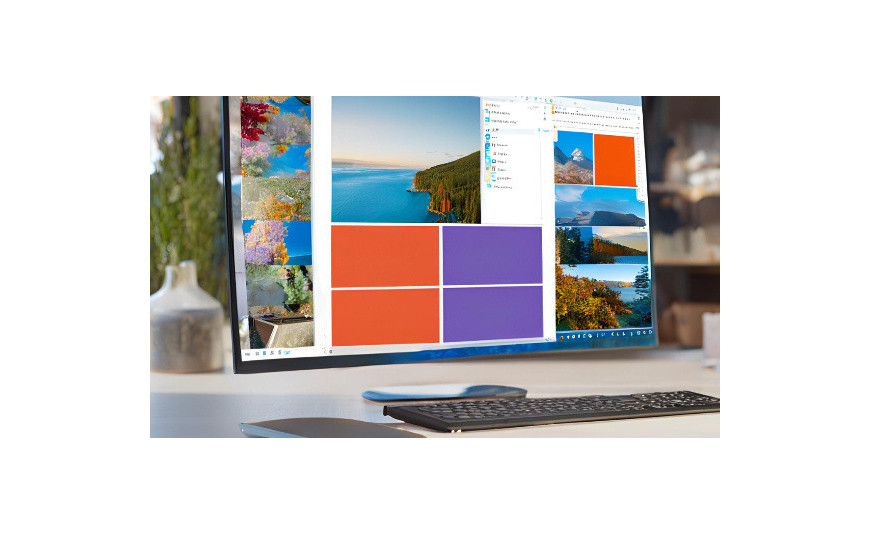
Microsoft szykuje kolejną dużą aktualizację swojego flagowego systemu operacyjnego. Choć oficjalna data premiery nie jest jeszcze znana, w sieci już pojawiają się pierwsze informacje na temat potencjalnych nowości i ulepszeń w Windows 12. Zobacz, jakie zmiany się szykują i jak się przygotować do aktualizacji.
Windows 12 – kiedy zadebiutuje?
To kiedy Windows 12? Microsoft nie zdradził jeszcze oficjalnej daty premiery swojego systemu, jednak firma wróciła do swojego trzyletniego cyklu wydawniczego. Windows 11 pojawił się w październiku 2021 roku, więc bardzo prawdopodobnym terminem premiery „dwunastki” wydawała się druga połowa 2024 roku.
Jednak Microsoft oficjalnie potwierdził, że na razie woli skupić na rozwoju obecnego systemu. Z tego powodu prawdopodobnie przyjdzie nam poczekać na Windows 12 do 2025 roku.
Integracja z chmurą i usługami online
Jednym z głównych kierunków rozwoju Windows 12 ma być jeszcze ściślejsza integracja z usługami chmurowymi Microsoftu takimi jak OneDrive czy Microsoft 365. Gigant z Redmond chce rozbudowywać swój ekosystem, w którym użytkownicy mają dostęp do swoich plików, ustawień i aplikacji na różnych urządzeniach.
Po zalogowaniu do Windows 12 za pomocą konta Microsoft, wszystkie potrzebne dane i narzędzia mają być dostępne od ręki – niezależnie od tego, z jakiego komputera czy tabletu korzystasz. To duże ułatwienie, jeśli pracujesz na wielu sprzętach.
Sztuczna inteligencja w Twoim komputerze
Windows 12 ma także wykorzystać potencjał sztucznej inteligencji, aby usprawnić działanie systemu i ułatwiać codzienne zadania. Jednym z pomysłów jest wprowadzenie inteligentnego asystenta, który miałby pomagać w wyszukiwaniu plików czy pisaniu maili.
Krążą nawet doniesienia, że Microsoft chce zastąpić przycisk Start interfejsem Copilota – autorskiego microsoftowego asystenta opartego na technologii GPT-4 firmy OpenAI. Czy tak się stanie? Zobaczymy.
Odświeżony interfejs i nowe funkcje
Wraz z premierą Windows 12 można oczekiwać także odświeżenia interfejsu użytkownika. Microsoft z pewnością będzie chciał wprowadzić rozwiązania, które dadzą użytkownikom poczuć, że mają do czynienia z czymś nowocześniejszym.
Oprócz wspomnianych zmian w menu Start prawdopodobnie pojawią się też nowe wersje systemowych aplikacji.
Microsoft z systemu na system rozwija też funkcję wirtualnych pulpitów, wcześniej znanych z systemów macOS. Jeśli do tej pory nie korzystałeś z tego rozwiązania, to premiera Win 12 może być dobrą okazją do tego, by je wypróbować.
Jak przygotować się do aktualizacji?
Choć do premiery zostało jeszcze trochę czasu, już teraz warto pomyśleć o przygotowaniach do aktualizacji.
- Przede wszystkim upewnij się, że Twój komputer będzie spełniał wymagania sprzętowe nowego systemu. Jeszcze nie znamy oficjalnej specyfikacji, ale prawdopodobnie Windows 12 będzie wymagał nowszych podzespołów niż „jedenastka”. Jeśli Twój komputer ma już kilka lat, warto rozważyć modernizację lub wymianę sprzętu.
- Przed aktualizacją dobrze też zrobić porządki w plikach i programach – usuń nieużywane aplikacje i przenieś ważne dokumenty do chmury lub na dysk zewnętrzny.
Sam proces aktualizacji powinien przebiegać podobnie jak w przypadku poprzednich wersji systemu – przez ustawienia Windows Update. Jednak dla bezpieczeństwa wykonaj wcześniej kopię zapasową najważniejszych danych.
Windows 12 – nadchodzi nowa era komputerów?
Windows 12 zapowiada się jako ważna aktualizacja, wprowadzająca wiele nowości i usprawnień. Od głębszej integracji z chmurą przez wykorzystanie sztucznej inteligencji po odświeżony interfejs – zmian ma być sporo.
Premiera prawdopodobnie odbędzie się dopiero w 2025 roku, ale warto śledzić informacje na temat Windows 12 i zastanowić się nad przygotowaniami do aktualizacji. Dzięki temu sprawnie „przesiądziesz” się na nowy system, gdy tylko zadebiutuje na rynku.
FAQ – najczęściej zadawane pytania
- Czy za Windows 12 trzeba będzie zapłacić?
Na razie nie wiadomo, czy Windows 12 będzie darmową aktualizacją. Ale niewykluczone, że Microsoft pójdzie śladem poprzednich wersji systemu i udostępni ją za darmo użytkownikom legalnego Windows 10 lub 11. - Czy mój obecny komputer poradzi sobie z Windows 12?
Dokładne wymagania sprzętowe Windows 12 nie są jeszcze znane. Prawdopodobnie będą one wyższe niż w przypadku Windows 11. Jeśli Twój komputer ma kilka lat, sprawdź, czy spełnia obecne wymagania „jedenastki” i w razie potrzeby pomyśl o modernizacji. - Kiedy dokładnie pojawi się Windows 12?
Choć oficjalna data premiery nie jest znana, prawdopodobnie możemy spodziewać się nowego Windowsa w 2025 roku. Chyba że plany Microsoftu z jakiegoś powodu się zmienią. - Czy lepiej wstrzymać się z zakupem nowego komputera do czasu premiery Windows 12?
To zależy od Twoich potrzeb i stanu obecnego sprzętu. Jeśli Twój komputer wciąż dobrze działa, nie ma potrzeby czekać. Jeżeli jednak i tak planujesz wymianę w najbliższym czasie, warto poczekać na więcej informacji o Windows 12 i ewentualnie kupić komputer z nowym systemem.






Dodaj komentarz Anuluj odpowiedź